Error 25085 – Setup failed to register VMware Update Manager extension to VMware vCenter Server

I upgraded my vCenter to 4.1u1 while my VUM was still 4.0 (u2 iirc).  I decided to upgrade my VUM to match, and all was going well until I got this message:

Error 25085 – Setup failed to register VMware Update Manager extension to VMware vCenter Server

Continue reading

Script I needed to get info for multiple VMs = Get-VMInfo.ps1

I’ve recently had a ton of requests for information about specific VMs. They want to know how many disks they have, CPU count, how much RAM, and which environment the VM resides in.

Instead of constantly searching vCenter, I wrote this quickly during the meeting to query multiple servers.
Continue reading

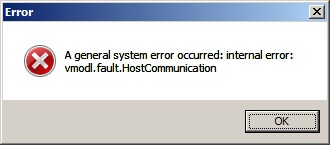
System Error: vmodl.fault.hostcommunication

I upgraded one of my lab hosts to ESXi 4.1 yesterday and was plagued with this error:

System Error: vmodl.fault.hostcommunication

vmodl.fault.hostcommunication

A lot of people are getting this error without a lot of direction. As it turns out, this is because I upgraded one of my hosts to 4.1 without upgrading vCenter to 4.1. Silly me! Who would have thought that vSphere vCenter couldn’t manage a vSphere host because it’s rev is 0.1 higher?

VMware vSphere 4.1 Configuration Maximums

ESXi 4.0 Update 1 brought with it one major update (as I pointed out here). Now that 4.1 was released on July 13th, I wanted to take a look and see if anything else major has been changed.

Biggest change was they lifted the 160 VMs per host in an 8-node HA cluster.  Now it’s the maximum of 320 VMs per host, and a maximum of 32 nodes per HA cluster.  Problem is, they imposed a maximum of 3000 VMs per cluster (standard, HA, or DRS, they no longer differentiate them), so you’d just have to find your sweet spot to maximize how you want your cluster set up.  Not that 3000 VMs per cluster is a problem, but if you ran 320 VMs on 75% of a 32-node cluster (leaving 25% for failover), that’s 7680.  That’s a difference of 4680 VMs.  At any rate, I’m glad they lifted the 40 VMs per host in a 9+ configuration.

The Configuration Maximums for 4.1 can be found here.

Here are some of the key features that have changed:

Continue reading

Finding WWNs for HBAs in multiple ESX or ESXi hosts, standalone or clustered

When building a new cluster, your storage team (or you) may need to add several hosts into the shared storage zone. It’s a pain to go to each host, configuration, storage adapters, then copy out the WWN.

With this script, you can supply a vCenter server and Cluster/Folder/Datacenter (any logical container) and it will list all the WWNs for Fibre Channel devices. But what if you don’t have vCenter stood up yet? No problem, you can also supply a list of ESX/ESXi hosts to scan.

Shawn & I built this because we have 20 hosts we need the WWNs from to provide to our storage team, and vCenter isn’t alive yet.

Our script: Continue reading