Following up on my home lab blog post from nearly three years ago, man how time flies! The difference? I’ve actually ordered the below BOM!
I’ve been running my homelab on four identical machines for several years, and while they handled VMware 8.0u2 well enough, the hardware increasingly became the limiting factor. Between vSAN ESA’s RAM overhead and the modest core count of the i5-7600, it was time for a refresh.
This post covers the hardware transition: what I was running, the new BOM, why the upgrade was necessary, realistic power consumption estimates, and notes about PCIe lane realities. Software coverage will come in a follow-up article.
Current Cluster (The Old Setup)
Each of the four nodes included:
- Motherboard: MSI Z270 SLI
- CPU: Intel i5-7600
- RAM: 64 GB (4 × Timetec 16 GB)
- Boot Disk: SanDisk 240 GB SATA
- Data Drives: Intel Optane 900P 280 GB PCIe Add-In-Cards (AIC)
- NIC: Vogzone M.2 → 10GbE RJ45
Across the cluster I ran a total of 10 Intel Optane 900P AICs (two nodes with three, two nodes with two), which paired exceptionally well with vSAN. Unfortunately, vSAN ESA consumed nearly half of each node’s 64 GB, leaving little headroom for workloads. vSAN OSA used far less RAM, but it also failed to realize the full performance of the Optanes, so ESA remained the choice, despite the memory penalty.
New Hardware BOM (The Upgrade)
I designed the new build to address core count, RAM capacity, PCIe bandwidth, and platform modernity:
- Motherboard: ASRock X870 LiveMixer WiFi
- CPU: AMD Ryzen 9 7900 (65 W TDP)
- RAM: CORSAIR VENGEANCE 64 GB kit (with room to grow)
- Data: Addlink S90 Lite 2 TB NVMe Gen4
- Reused: Optane AICs, Vogzone 10GbE NIC, and boot disks
Why this platform?
3× the core count
The Ryzen 9 7900 is a massive improvement over the 4-core i5-7600. There are no E-cores, so every core is a full-power, full-feature core—ideal for VMware workloads. While it is the [slightly older] Zen 4/Raphael 7000-series CPU, the current Zen 5 9000-series CPU of the same core count is 120W TDP. That’s nearly double the 7900’s TDP, so I’m perfectly fine with this choice.
Much more memory headroom
- Old platform physical max: 64 GB
- New platform:
- Motherboard supports up to 256 GB
- CPU supports up to 128 GB
- I chose 64 GB because ZOMG have you seen RAM prices??? 128GB went from $400 to >$1200 since September!
I know I’m not upgrading RAM in terms of capacity, but performance is getting a bump, and hopefully RAM prices drop some time soon…
Modern PCIe & I/O
More lanes, faster lanes, more NVMe connectivity, and far fewer tradeoffs. I still have to be mindful of which M.2 slots I populate, since they share lanes with some of the PCIe slots, but the manual outlines all this info, so don’t forget to RTFM!
Important Note: PCIe Slot Reality
In my really old post when I first got the Intel Optanes, I talked about upgrading to newer Intel CPUs, PCIe lanes, bifurcation, etc. I kind of ended up with decision paralysis and just stuck with what I had… except that isn’t working anymore, so now here we are!
Many consumer motherboards have full-length PCIe x16 slots that are not wired x16 electrically. Meaning they don’t have the metal pins to connect to the lands on the actual PCIe card living in the slot. Sure, it fits, but not all cards are capable of operating at x1 or x2 if they’re designed for x4, x8, or x16. It’s kind of like having an 800HP car in stop & go traffic, the 1990 3-cylinder 1.0L Geo Metro could actually get ahead of you simply by lane choice.
These ‘fake’ x16 slots often operate at x4, x2, or even x1, depending on chipset lane sharing, M.2 population, or slot ordering. Sometimes even using an M.2 slot can disable SATA ports.
This matters when running hardware like Optane PCIe AICs or 10GbE adapters, with M.2 storage, where actual lane width directly impacts real throughput. So basically, RTFM to make sure those lower PCIe slots can actually support the cards your installing.
Power Consumption Comparison (Old vs New)
Below is a cluster-wide view comparing idle and full load:
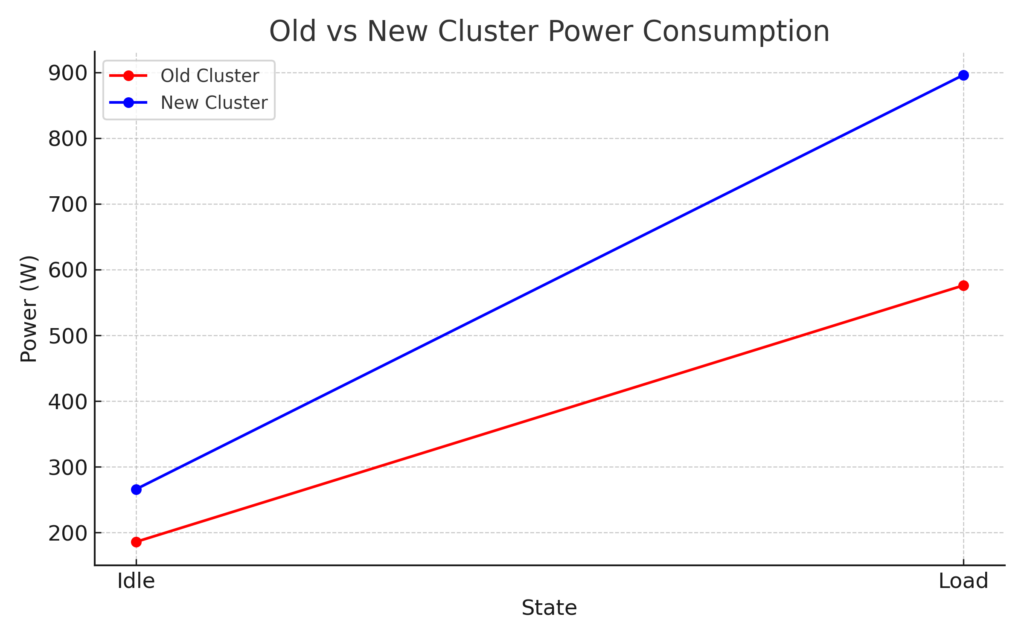
These values are estimates based on component class, expected VRM efficiency, NVMe and Optane draw, and typical power behavior of both platforms.
What This Means
Idle
The new Ryzen platform draws ~80 W more at cluster idle. The added RAM, NVMe Gen4 drives, and more robust motherboard VRMs contribute to this.
Load
Under high utilization, the Ryzen cluster draws ~300 W more than the old setup, expected given the drastic increase in compute capability.
Efficiency Perspective
Even though absolute wattage rises:
- Performance per watt skyrockets
- Per-VM efficiency improves
- Cluster density increases
- CPU saturation is far less likely
This is simply the cost of gaining modern compute headroom.
Final Thoughts
This upgrade gives me massively more usable compute, vastly higher RAM capacity, and a much better platform for the Optane AICs. The Ryzen 9 7900 being a 65 W part also helps keep idle efficiency reasonable despite the generational leap in capability.
I’ll follow up with a platform-focused post later.
Happy labbing!